

Reviews and checklists
Use reviews when some people write and others decide what goes live: a contributor submits an entry, an editor publishes it or sends it back with a note, and everyone hears about each step. Use a checklist when every entry of a type must have something before it is published, such as a featured image. Both are optional: a site where everyone publishes their own work needs neither.
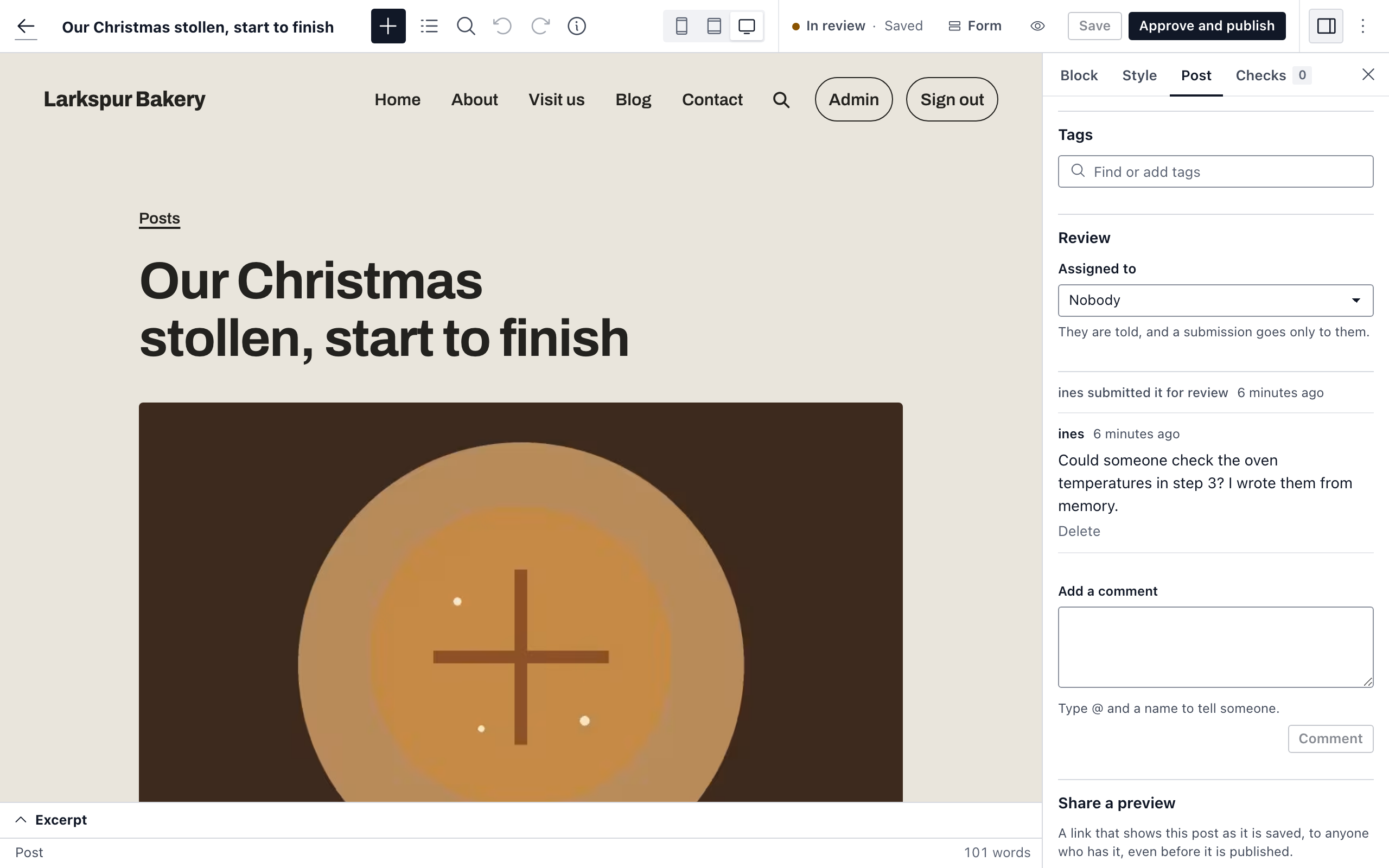
People who may write but not publish, such as contributors, send their work to an editor for review. The editor publishes it, or sends it back saying what to change. Everyone involved is told at each step.
Submit for review
- Write the entry and choose Submit for review. Like publishing, this needs a title and every field marked Required to publish.
- The status changes to In review. If the entry is assigned to someone, they are told; otherwise everyone who may publish it is.
While it waits you can keep editing it: Save changes keeps it in review. Withdraw (back to draft) takes it out of review.
Review an entry
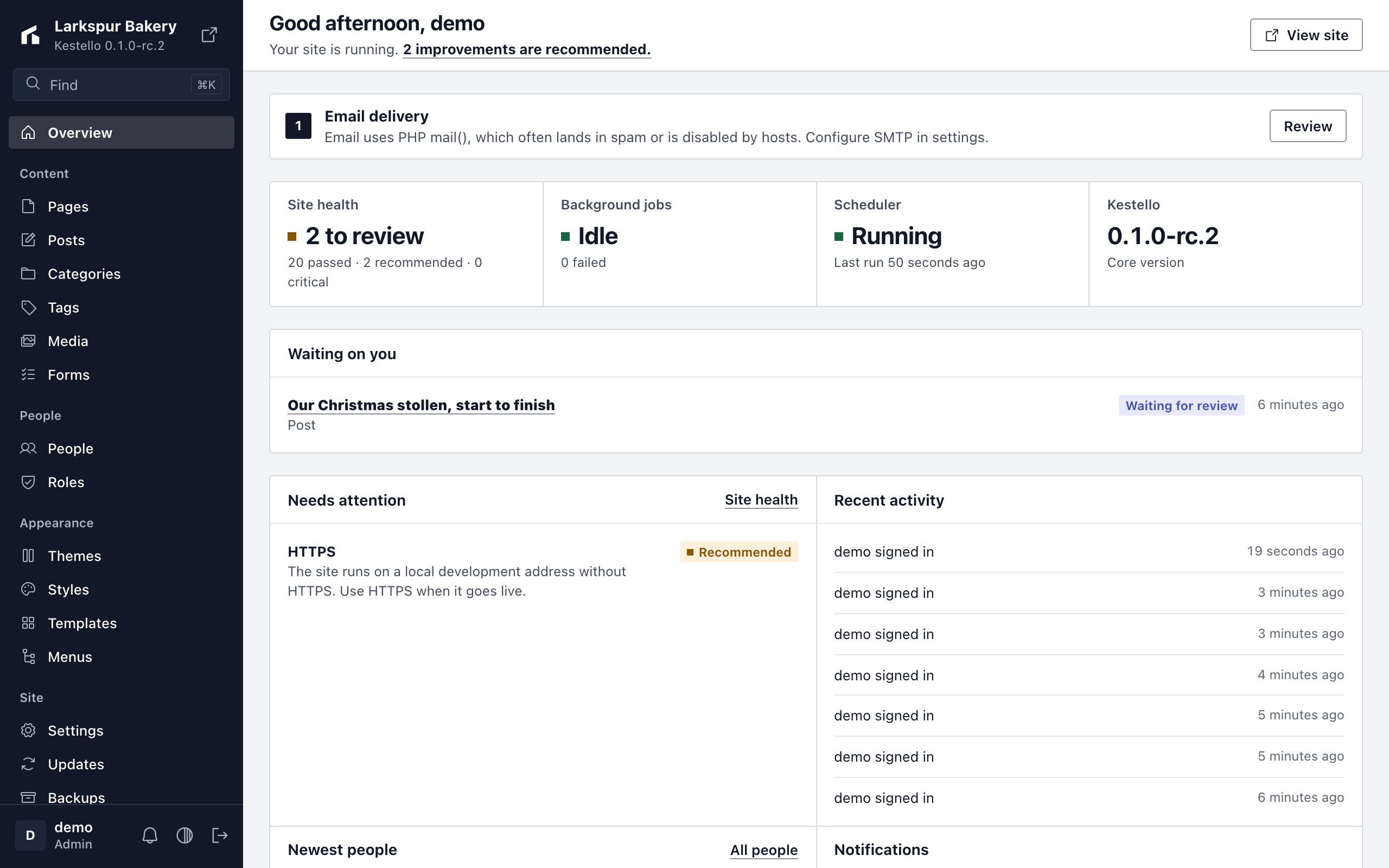
Entries waiting for review are under In review at the top of the content list, and on the Overview in Waiting on you (see What waits on you). Open one and choose:
- Approve and publish to publish it. If Publish on is in the future, the button says Approve and schedule instead.
- Request changes to send it back. Write what should change and choose Send back. The entry becomes a draft again, and the person who submitted it is told, with your note.
- Save without deciding to save your own edits and leave it in review.
Either way, the person who submitted it hears what you decided.
Comments
The Review card in the editor's sidebar holds the conversation about an entry: comments, and the review steps between them, such as "eddie asked for changes" with the note. Type in Add a comment and choose Comment, or press Ctrl+Enter (Cmd+Enter on a Mac).
Comments are only seen in the admin, never on the site. Anyone who can open the entry may comment. A comment reaches the entry's author, the person it is assigned to and everyone who wrote on it before. You can delete your own comments; editors can delete anyone's. The review steps stay.
To bring someone else in, name them with @ and their username, for example @maria could you check the dates?. As you type after the @, a list of people who may edit entries of this type appears: use the arrow keys and Enter (or click) to pick one. Everyone named is told "eddie mentioned you on the post …", in the bell and by email, once even if they would have heard about the comment anyway. Someone who can't open the entry, such as an author named on another person's post, isn't told. Up to 10 people can be named in one comment.
Assign an entry
Under Assigned to in the Review card, pick the person who should look after the entry. They are told, and when it is submitted for review only they are, instead of every editor. Only people who may edit entries of that type are listed. The content list shows who each entry is assigned to.
Notifications
Review steps and comments arrive in the bell at the top of the admin, and by email. To choose which you get by email, open your profile, then Notifications, and change Reviews or Editorial comments.
Submissions, decisions and assignments are recorded in the audit log.
What waits on you
The Overview shows Waiting on you above everything else when there is something for you to do, most urgent first:
- Changes requested: your entries a reviewer sent back, until you submit them again.
- Assigned to you: entries assigned to you that are not published yet.
- Waiting for review: other people's entries in review that you may publish.
Each entry is listed once, with when it started waiting on you. Choose its title to open it. When nothing waits, the card isn't shown.
Before publishing
A content type can have a checklist of what its entries must, or should, have before they are published, such as a featured image or at least one category. Nothing is on the list until someone adds it, so the built-in types have none.
Set up the checklist
Open System → Content types and the type.
In Before publishing, choose Add a check and pick one:
Check Done when Has an excerpt The excerpt is filled in. Only for types with A short summary field. Has a featured image The type's first image field has an image. Has a term of a taxonomy At least one term of the taxonomy you choose, such as a category. Has a minimum number of words The text of the entry, the same text site search reads, has at least that many words. Has a search description Search description under Search and sharing is filled in. Plugins can add checks of their own; they appear in the same list.
Set Level: Required holds publishing back until the check is done, Recommended only shows it in the editor.
Choose Save.
In the editor
While a type has a checklist, the editor's sidebar shows a Before publishing card under the publish card. It is checked as you type, so you see an item turn done before you save. The top line says how many required items publishing waits for.
Choosing Publish or Schedule while a required item is not done keeps the entry as it was and names what is missing, for example "Before publishing: Has a featured image." Saving a draft and Submit for review always work, so a contributor can hand in an entry for an editor to finish.
The checklist applies when an entry is about to go live. An entry that is already published, or a check added after it was published, does not stop you from saving changes to it. If a check comes from a plugin that is no longer active, it shows as not available and never holds publishing back.
For developers
Types declared in code get a checklist with checklist(), and a plugin can add a check of its own, named after the plugin:
$cms->content->type('acme-recipe')
    ->label('Recipe', 'Recipes')
    ->checklist([
        ['check' => 'featured_image', 'level' => 'required'],
        ['check' => 'terms', 'taxonomy' => 'acme-cuisine'],          // recommended
        ['check' => 'words', 'min' => 150],
        ['check' => 'acme.tested', 'level' => 'required'],
    ]);

$cms->content->checks->define('acme.tested', 'Tested in our kitchen',
    fn (array $entry, array $item): bool => !empty($entry['data']['tested_on']));
A check gets the entry as ['title', 'excerpt', 'data', 'terms' => [taxonomy => count]], with the unsaved values while someone types. The editor asks POST /api/v1/content/{type}/checklist; a refused publish answers 422 with the missing items under checklist. View as PHP on a type built in the admin includes its checklist.
If something goes wrong
"You can't publish posts; save it as a draft or submit it for review." Your role may create entries but not publish them. Choose Submit for review.
"Add a title before submitting it for review." A submission needs a title, like a published entry.
"Only an entry in review can be sent back." Someone else already published it or sent it back. Reload the page.
"This person cannot edit posts." You tried to assign the entry to someone whose role may not edit that type. Pick someone from the list, or change their role.
Related pages
- Pages, posts and other content: statuses, scheduling and revisions.
- People, roles and sign-in: who may write, review and publish.
- The visual editor: where the Review and Before publishing cards sit.